本記事では、カスタマイズ可能なおしゃれなパンくずリストデザインのコードをご紹介します。
HTMLとCSSの両方をコピペすればすぐに利用できます。
コピペしたコードをカスタマイズし、自分好みにぜひ変更してみてください。
また、パンくずリスト作成にはul・li・olタグを利用します。
ul・li・olタグの使い方を詳しく知りたい人は「【html&css】ul・li・olの使い方とおしゃれなデザインリスト」を一読ください。
目次
おしゃれなフリー素材デザイン集
本サイトでは、パンくずリスト以外にも様々なHTML&CSSによるおしゃれな素材をご用意しています。
以下は、主なデザインカテゴリーです。
おしゃれな素材デザイン集
ぜひTOPページから「デザインギャラリー」を一読頂けますと幸いです。
Code Stock
Code Stock | UIコピペサイト
UIコピペサイト
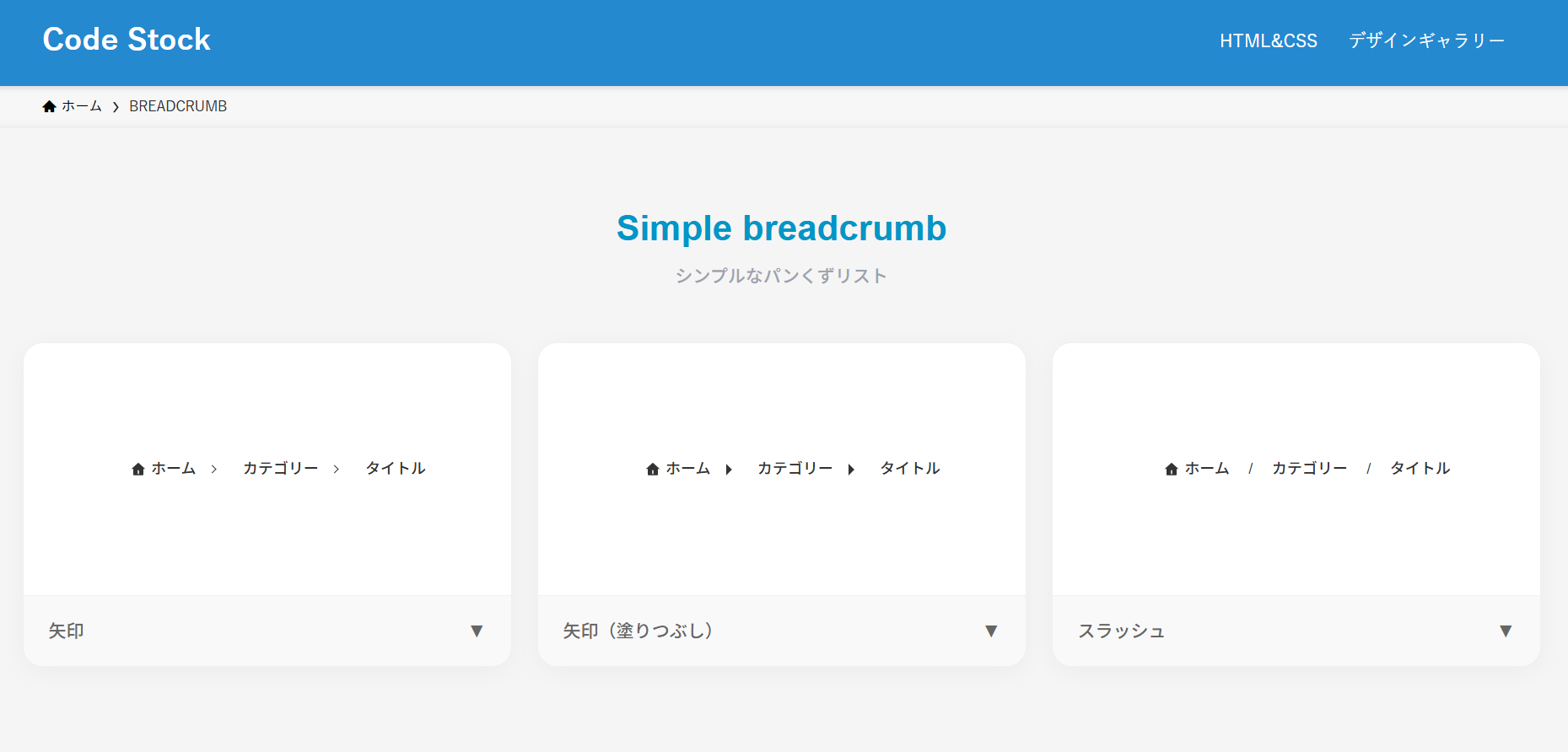
シンプルなパンくずリスト
ここでは、以下のシンプルなパンくずリストデザイン例を記載しています。
シンプルなパンくずリストデザイン
- 矢印
- 矢印(塗りつぶし)
- スラッシュ
実際のデザインプレビューとHTML&CSSコードを記載しています。
さらに、以下の項目もパンくずリストページでは選択式でご用意しました。
調整項目一覧
- 文字色
- アイコン色
- ホームアイコン:あり, なし
ご興味があれば「パンくずリスト一覧ページ」を一読ください。
Code Stock
BREADCRUMB | Code Stock
うまくコピペできない場合は、記事からもコピペできるよう準備しております。 Simple breadcrumb シンプルなパンくずリスト ホーム カテゴリー タイトル 矢印▼ ホーム カテ…
矢印
HTMLコード表示
<ul class="breadcrumb-1">
  <li><a href="#">ホーム</a></li>
  <li><a href="#">カテゴリー</a></li>
  <li>タイトル</li>
</ul>
CSSコード表示
.breadcrumb-1 {
  display: flex;
  gap: 0 22px;
  list-style: none;
  padding: 0;
  font-size: .9em;
}

.breadcrumb-1 li {
  display: flex;
  align-items: center;
}

.breadcrumb-1 li:first-child::before {
  display: inline-block;
  width: 1em;
  height: 1em;
  margin-right: 4px;
  background-image: url("data:image/svg+xml,%3Csvg xmlns='http://www.w3.org/2000/svg' viewBox='0 0 24 24'%3E%3Cpath d='M20 20C20 20.5523 19.5523 21 19 21H5C4.44772 21 4 20.5523 4 20V11L1 11L11.3273 1.6115C11.7087 1.26475 12.2913 1.26475 12.6727 1.6115L23 11L20 11V20ZM11 13V19H13V13H11Z' fill='%23333333'%3E%3C/path%3E%3C/svg%3E");
  background-repeat: no-repeat;
  content: '';
}

.breadcrumb-1 li:not(:last-child)::after {
  display: inline-block;
  transform: rotate(45deg);
  width: .3em;
  height: .3em;
  margin-left: 10px;
  border-top: 1px solid #333333;
  border-right: 1px solid #333333;
  content: '';
}

.breadcrumb-1 a {
  color: #333333;
  text-decoration: none;
}
矢印(塗りつぶし)
HTMLコード表示
<ul class="breadcrumb-2">
  <li><a href="#">ホーム</a></li>
  <li><a href="#">カテゴリー</a></li>
  <li>タイトル</li>
</ul>
CSSコード表示
.breadcrumb-2 {
  display: flex;
  gap: 0 20px;
  list-style: none;
  padding: 0;
  font-size: .9em;
}

.breadcrumb-2 li {
  display: flex;
  align-items: center;
}

.breadcrumb-2 li:first-child::before {
  display: inline-block;
  width: 1em;
  height: 1em;
  margin-right: 4px;
  background-image: url("data:image/svg+xml,%3Csvg xmlns='http://www.w3.org/2000/svg' viewBox='0 0 24 24'%3E%3Cpath d='M20 20C20 20.5523 19.5523 21 19 21H5C4.44772 21 4 20.5523 4 20V11L1 11L11.3273 1.6115C11.7087 1.26475 12.2913 1.26475 12.6727 1.6115L23 11L20 11V20ZM11 13V19H13V13H11Z' fill='%23333333'%3E%3C/path%3E%3C/svg%3E");
  background-repeat: no-repeat;
  content: '';
}

.breadcrumb-2 li:not(:last-child)::after {
  display: inline-block;
  width: .3em;
  height: .6em;
  margin-left: 12px;
  background-color: #333333;
  clip-path: polygon(0 0, 100% 50%, 0 100%);
  content: '';
}

.breadcrumb-2 a {
  color: #333333;
  text-decoration: none;
}
スラッシュ
HTMLコード表示
<ul class="breadcrumb-3">
  <li><a href="#">ホーム</a></li>
  <li><a href="#">カテゴリー</a></li>
  <li>タイトル</li>
</ul>
CSSコード表示
.breadcrumb-3 {
  display: flex;
  gap: 0 15px;
  list-style: none;
  padding: 0;
  font-size: .9em;
}

.breadcrumb-3 li {
  display: flex;
  align-items: center;
}

.breadcrumb-3 li:first-child::before {
  display: inline-block;
  width: 1em;
  height: 1em;
  margin-right: 4px;
  background-image: url("data:image/svg+xml,%3Csvg xmlns='http://www.w3.org/2000/svg' viewBox='0 0 24 24'%3E%3Cpath d='M20 20C20 20.5523 19.5523 21 19 21H5C4.44772 21 4 20.5523 4 20V11L1 11L11.3273 1.6115C11.7087 1.26475 12.2913 1.26475 12.6727 1.6115L23 11L20 11V20ZM11 13V19H13V13H11Z' fill='%23333333'%3E%3C/path%3E%3C/svg%3E");
  background-repeat: no-repeat;
  content: '';
}

.breadcrumb-3 li:not(:last-child)::after {
  display: inline-block;
  margin-left: 15px;
  color: #333333;
  content: '/';
}

.breadcrumb-3 a {
  color: #333333;
  text-decoration: none;
}
矢印大きめなパンくずリスト
ここでは、以下の矢印大きめなパンくずリストデザイン例を記載しています。
矢印大きめなパンくずリストデザイン
- 灰色背景
- カラフルな背景
実際のデザインプレビューとHTML&CSSコードを記載しています。
さらに、以下の項目もパンくずリストページでは選択式でご用意しました。
調整項目一覧
- 背景色
- 文字色
- アイコン色
- 区切り線の色
- ホームアイコン:あり, なし
ご興味があれば「パンくずリスト一覧ページ」を一読ください。
Code Stock
BREADCRUMB | Code Stock
うまくコピペできない場合は、記事からもコピペできるよう準備しております。 Simple breadcrumb シンプルなパンくずリスト ホーム カテゴリー タイトル 矢印▼ ホーム カテ…
灰色背景
HTMLコード表示
<ul class="breadcrumb-4">
  <li><a href="#">ホーム</a></li>
  <li><a href="#">カテゴリー</a></li>
  <li>タイトル</li>
</ul>
CSSコード表示
ul.breadcrumb-4 {
  display: flex;
  flex-wrap: nowrap;
  list-style: none !important;
  padding: 0 !important;
  margin-bottom: 2em !important;
  background-color: transparent !important;
  border-radius: 0 !important;
  gap: 0 !important;
}

.breadcrumb-4 li {
  position: relative;
  padding: 10px 10px 10px 30px;
  background-color: #f2f2f2;
  color: #333333;
  margin: 0;
  margin-right: 4px;
  display: flex;
  align-items: center;
  height: 40px;
  box-sizing: border-box;
  list-style: none !important;
}

.breadcrumb-4 li:first-child {
  padding-left: 15px;
  border-radius: 4px 0 0 4px;
}

.breadcrumb-4 li::after {
  content: '';
  position: absolute;
  top: 0;
  right: -20px;
  width: 0;
  height: 0;
  border-top: 20px solid transparent;
  border-bottom: 20px solid transparent;
  border-left: 20px solid #f2f2f2;
  z-index: 10;
}

.breadcrumb-4 li:not(:first-child)::before {
  content: '';
  position: absolute;
  top: 0;
  left: 0;
  width: 0;
  height: 0;
  border-top: 20px solid transparent;
  border-bottom: 20px solid transparent;
  border-left: 20px solid #ffffff;
  z-index: 5;
}

.breadcrumb-4 li:last-child::after {
  display: none;
}
.breadcrumb-4 li:last-child {
  border-radius: 0 4px 4px 0;
  padding-right: 20px;
}

.breadcrumb-4 a {
  color: #333333;
  text-decoration: none;
  display: flex;
  align-items: center;
}

.breadcrumb-4 li:first-child a::before {
  content: '';
  display: inline-block;
  width: 14px;
  height: 14px;
  margin-right: 8px;
  background-image: url("data:image/svg+xml,%3Csvg xmlns='http://www.w3.org/2000/svg' viewBox='0 0 24 24' fill='%23333333'%3E%3Cpath d='M10 20v-6h4v6h5v-8h3L12 3 2 12h3v8z'/%3E%3C/svg%3E");
  background-repeat: no-repeat;
  background-position: center;
  background-size: contain;
}
カラフルな背景
HTMLコード表示
<ul class="breadcrumb-5">
  <li><a href="#">ホーム</a></li>
  <li><a href="#">カテゴリー</a></li>
  <li>タイトル</li>
</ul>
CSSコード表示
ul.breadcrumb-5 {
  display: flex;
  flex-wrap: nowrap;
  list-style: none !important;
  padding: 0 !important;
  margin-bottom: 2em !important;
  background-color: transparent !important;
  border-radius: 0 !important;
  gap: 0 !important;
}

.breadcrumb-5 li {
  position: relative;
  padding: 10px 10px 10px 30px;
  background-color: #2589d0;
  color: #ffffff;
  margin: 0;
  margin-right: 4px;
  display: flex;
  align-items: center;
  height: 40px;
  box-sizing: border-box;
  list-style: none !important;
}

.breadcrumb-5 li:first-child {
  padding-left: 15px;
  border-radius: 4px 0 0 4px;
}

.breadcrumb-5 li::after {
  content: '';
  position: absolute;
  top: 0;
  right: -20px;
  width: 0;
  height: 0;
  border-top: 20px solid transparent;
  border-bottom: 20px solid transparent;
  border-left: 20px solid #2589d0;
  z-index: 10;
}

.breadcrumb-5 li:not(:first-child)::before {
  content: '';
  position: absolute;
  top: 0;
  left: 0;
  width: 0;
  height: 0;
  border-top: 20px solid transparent;
  border-bottom: 20px solid transparent;
  border-left: 20px solid #ffffff;
  z-index: 5;
}

.breadcrumb-5 li:last-child::after {
  display: none;
}

.breadcrumb-5 li:last-child {
  border-radius: 0 4px 4px 0;
  padding-right: 20px;
}

.breadcrumb-5 a {
  color: #ffffff;
  text-decoration: none;
  display: flex;
  align-items: center;
}

.breadcrumb-5 li:first-child a::before {
  content: '';
  display: inline-block;
  width: 14px;
  height: 14px;
  margin-right: 8px;
  background-image: url("data:image/svg+xml,%3Csvg xmlns='http://www.w3.org/2000/svg' viewBox='0 0 24 24' fill='%23ffffff'%3E%3Cpath d='M10 20v-6h4v6h5v-8h3L12 3 2 12h3v8z'/%3E%3C/svg%3E");
  background-repeat: no-repeat;
  background-position: center;
  background-size: contain;
}