本記事では、カスタマイズ可能なおしゃれな検索フォームデザインのコードをご紹介します。
HTMLとCSSの両方をコピペすればすぐに利用できます。
コピペしたコードをカスタマイズし、自分好みにぜひ変更してみてください。
また、検索フォーム作成にはformタグを利用します。
formタグの使い方を詳しく知りたい人は「【HTML】formタグの使い方:属性の書き方や複数送信・CSS装飾」を一読ください。
目次
おしゃれなフリー素材デザイン集
本サイトでは、検索フォーム以外にも様々なHTML&CSSによるおしゃれな素材をご用意しています。
以下は、主なデザインカテゴリーです。
おしゃれな素材デザイン集
ぜひTOPページから「デザインギャラリー」を一読頂けますと幸いです。
Code Stock
Code Stock | UIコピペサイト
UIコピペサイト
シンプルな検索フォーム
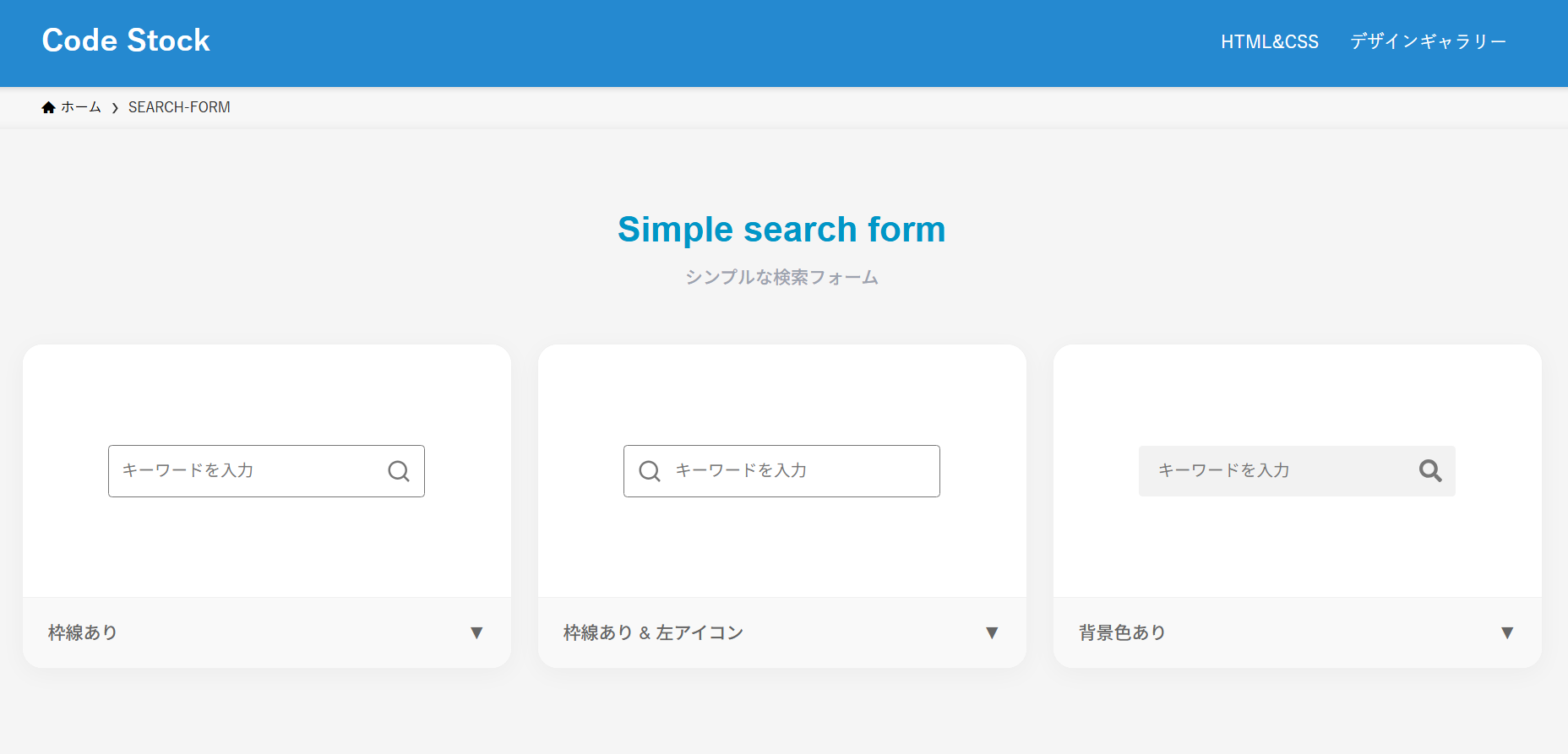
ここでは、以下のシンプルな検索フォームデザイン例を記載しています。
シンプルな検索フォームデザイン
- 枠線あり
- 枠線あり&左アイコン
- 背景色あり
実際のデザインプレビューとHTML&CSSコードを記載しています。
さらに、以下の項目も検索フォームページでは選択式でご用意しました。
調整項目一覧
- 枠線の色
- プレースホルダーの色
- フォームの形状
- 背景色
ご興味があれば「検索フォーム一覧ページ」を一読ください。
Code Stock
SEARCH-FORM | Code Stock
うまくコピペできない場合は、記事からもコピペできるよう準備しております。 Simple search form シンプルな検索フォーム 枠線あり▼ 枠線あり & 左アイコン▼ 背景色あり▼ …
枠線あり
HTMLコード表示
<form action="#" class="search-form-1">
  <input type="text" placeholder="キーワードを入力">
  <button type="submit" aria-label="検索"></button>
</form>
CSSコード表示
.search-form-1 {
  display: flex;
  width: 250px;
  justify-content: space-between;
  align-items: center;
  margin: 0 auto 2em;
  overflow: hidden;
  border: 1px solid #777777;
  border-radius: 3px;
}

.search-form-1 input {
  width: 200px;
  height: 45px;
  padding: 5px 15px;
  border: none;
  box-sizing: border-box;
  font-size: 1em;
  background-color: transparent;
  outline: none;
}

.search-form-1 input::placeholder {
  color: #777777;
}

.search-form-1 button {
  display: flex;
  justify-content: center;
  align-items: center;
  width: 50px;
  height: 45px;
  border: none;
  background-color: transparent;
  cursor: pointer;
}

.search-form-1 button::after {
  width: 24px;
  height: 24px;
  background-image: url("data:image/svg+xml,%3Csvg xmlns='http://www.w3.org/2000/svg' viewBox='0 0 24 24'%3E%3Cpath d='M18.031 16.6168L22.3137 20.8995L20.8995 22.3137L16.6168 18.031C15.0769 19.263 13.124 20 11 20C6.032 20 2 15.968 2 11C2 6.032 6.032 2 11 2C15.968 2 20 6.032 20 11C20 13.124 19.263 15.0769 18.031 16.6168ZM16.0247 15.8748C17.2475 14.6146 18 12.8956 18 11C18 7.1325 14.8675 4 11 4C7.1325 4 4 7.1325 4 11C4 14.8675 7.1325 18 11 18C12.8956 18 14.6146 17.2475 15.8748 16.0247L16.0247 15.8748Z' fill='%23777777'%3E%3C/path%3E%3C/svg%3E");
  background-repeat: no-repeat;
  content: '';
}
枠線あり&左アイコン
HTMLコード表示
<form action="#" class="search-form-2">
  <input type="text" placeholder="キーワードを入力">
  <button type="submit" aria-label="検索"></button>
</form>
CSSコード表示
.search-form-2 {
  display: flex;
  width: 250px;
  margin: 0 auto 2em;
  flex-direction: row-reverse;
  align-items: center;
  overflow: hidden;
  border: 1px solid #777777;
  border-radius: 3px;
}

.search-form-2 input {
  width: 200px;
  height: 45px;
  padding: 5px 15px 5px 0;
  border: none;
  box-sizing: border-box;
  font-size: 1em;
  outline: none;
  background-color: transparent;
}

.search-form-2 input::placeholder {
  color: #777777;
}

.search-form-2 button {
  display: flex;
  justify-content: center;
  align-items: center;
  width: 50px;
  height: 45px;
  border: none;
  background-color: transparent;
  cursor: pointer;
}

.search-form-2 button::before {
  width: 24px;
  height: 24px;
  background-image: url("data:image/svg+xml,%3Csvg xmlns='http://www.w3.org/2000/svg' viewBox='0 0 24 24'%3E%3Cpath d='M18.031 16.6168L22.3137 20.8995L20.8995 22.3137L16.6168 18.031C15.0769 19.263 13.124 20 11 20C6.032 20 2 15.968 2 11C2 6.032 6.032 2 11 2C15.968 2 20 6.032 20 11C20 13.124 19.263 15.0769 18.031 16.6168ZM16.0247 15.8748C17.2475 14.6146 18 12.8956 18 11C18 7.1325 14.8675 4 11 4C7.1325 4 4 7.1325 4 11C4 14.8675 7.1325 18 11 18C12.8956 18 14.6146 17.2475 15.8748 16.0247L16.0247 15.8748Z' fill='%23777777'%3E%3C/path%3E%3C/svg%3E");
  background-repeat: no-repeat;
  content: '';
}
背景色あり
HTMLコード表示
<form action="#" class="search-form-3">
  <input type="text" placeholder="キーワードを入力">
  <button type="submit" aria-label="検索"></button>
</form>
CSSコード表示
.search-form-3 {
  display: flex;
  justify-content: space-between;
  align-items: center;
  width: 250px;
  margin: 0 auto 2em;
  overflow: hidden;
  border-radius: 3px;
  background-color: #f2f2f2;
}

.search-form-3 input {
  width: 200px;
  height: 45px;
  padding: 5px 15px;
  border: none;
  box-sizing: border-box;
  background-color: transparent;
  font-size: 1em;
  outline: none;
}

.search-form-3 input::placeholder {
  color: #777777;
}

.search-form-3 button {
  display: flex;
  justify-content: center;
  align-items: center;
  width: 50px;
  height: 45px;
  border: none;
  background-color: transparent;
  cursor: pointer;
}

.search-form-3 button::after {
  width: 24px;
  height: 24px;
  background-image: url('data:image/svg+xml;charset=utf8,%3Csvg%20xmlns%3D%22http%3A%2F%2Fwww.w3.org%2F2000%2Fsvg%22%20viewBox%3D%220%200%2024%2024%22%3E%20%3Cpath%20d%3D%22M23.7%2020.8%2019%2016.1c-.2-.2-.5-.3-.8-.3h-.8c1.3-1.7%202-3.7%202-6C19.5%204.4%2015.1%200%209.7%200S0%204.4%200%209.7s4.4%209.7%209.7%209.7c2.3%200%204.3-.8%206-2v.8c0%20.3.1.6.3.8l4.7%204.7c.4.4%201.2.4%201.6%200l1.3-1.3c.5-.5.5-1.2.1-1.6zm-14-5.1c-3.3%200-6-2.7-6-6s2.7-6%206-6%206%202.7%206%206-2.6%206-6%206z%22%20fill%3D%22%23777777%22%3E%3C%2Fpath%3E%20%3C%2Fsvg%3E');
  background-repeat: no-repeat;
  content: '';
}
カラフルな検索フォーム
ここでは、以下のカラフルな検索フォームデザイン例を記載しています。
カラフルな検索フォームデザイン
- スタンダード
- 枠線あり
実際のデザインプレビューとHTML&CSSコードを記載しています。
さらに、以下の項目も検索フォームページでは選択式でご用意しました。
調整項目一覧
- 枠線の色
- ボタンの色
- プレースホルダーの色
- フォームの形状
- 背景色
ご興味があれば「検索フォーム一覧ページ」を一読ください。
Code Stock
SEARCH-FORM | Code Stock
うまくコピペできない場合は、記事からもコピペできるよう準備しております。 Simple search form シンプルな検索フォーム 枠線あり▼ 枠線あり & 左アイコン▼ 背景色あり▼ …
スタンダード
HTMLコード表示
<form action="#" class="search-form-4">
  <input type="text" placeholder="キーワードを入力">
  <button type="submit" aria-label="検索"></button>
</form>
CSSコード表示
.search-form-4 {
  display: flex;
  justify-content: center;
  align-items: center;
  overflow: hidden;
  border-radius: 3px;
}

.search-form-4 input {
  width: 250px;
  height: 45px;
  padding: 5px 15px;
  border: none;
  border-radius: 3px 0 0 3px;
  box-sizing: border-box;
  background-color: #f2f2f2;
  font-size: 1em;
  outline: none;
}

.search-form-4 input::placeholder {
  color: #777777;
}

.search-form-4 button {
  display: flex;
  justify-content: center;
  align-items: center;
  width: 50px;
  height: 45px;
  border: none;
  border-radius: 0 3px 3px 0;
  background-color: #2589d0;
  cursor: pointer;
}

.search-form-4 button::after {
  width: 24px;
  height: 24px;
  background-image: url("data:image/svg+xml,%3Csvg xmlns='http://www.w3.org/2000/svg' viewBox='0 0 24 24'%3E%3Cpath d='M18.031 16.6168L22.3137 20.8995L20.8995 22.3137L16.6168 18.031C15.0769 19.263 13.124 20 11 20C6.032 20 2 15.968 2 11C2 6.032 6.032 2 11 2C15.968 2 20 6.032 20 11C20 13.124 19.263 15.0769 18.031 16.6168ZM16.0247 15.8748C17.2475 14.6146 18 12.8956 18 11C18 7.1325 14.8675 4 11 4C7.1325 4 4 7.1325 4 11C4 14.8675 7.1325 18 11 18C12.8956 18 14.6146 17.2475 15.8748 16.0247L16.0247 15.8748Z' fill='%23fff'%3E%3C/path%3E%3C/svg%3E");
  background-repeat: no-repeat;
  content: '';
}
枠線あり
HTMLコード表示
<form action="#" class="search-form-5">
  <input type="text" placeholder="キーワードを入力">
  <button type="submit" aria-label="検索"></button>
</form>
CSSコード表示
.search-form-5 {
  display: flex;
  width: 250px;
  margin: 0 auto 2em;
  align-items: center;
  overflow: hidden;
  border: 2px solid #2589d0;
  border-radius: 3px;
}

.search-form-5 input {
  width: 200px;
  height: 45px;
  padding: 5px 15px;
  border: none;
  box-sizing: border-box;
  font-size: 1em;
  outline: none;
}

.search-form-5 input::placeholder {
  color: #777777;
}

.search-form-5 button {
  display: flex;
  justify-content: center;
  align-items: center;
  width: 50px;
  height: 45px;
  background-color: #2589d0;
  cursor: pointer;
}

.search-form-5 button::after {
  width: 24px;
  height: 24px;
  background-image: url("data:image/svg+xml,%3Csvg xmlns='http://www.w3.org/2000/svg' viewBox='0 0 24 24'%3E%3Cpath d='M18.031 16.6168L22.3137 20.8995L20.8995 22.3137L16.6168 18.031C15.0769 19.263 13.124 20 11 20C6.032 20 2 15.968 2 11C2 6.032 6.032 2 11 2C15.968 2 20 6.032 20 11C20 13.124 19.263 15.0769 18.031 16.6168ZM16.0247 15.8748C17.2475 14.6146 18 12.8956 18 11C18 7.1325 14.8675 4 11 4C7.1325 4 4 7.1325 4 11C4 14.8675 7.1325 18 11 18C12.8956 18 14.6146 17.2475 15.8748 16.0247L16.0247 15.8748Z' fill='%23fff'%3E%3C/path%3E%3C/svg%3E");
  background-repeat: no-repeat;
  content: '';
}
その他の検索フォーム
ここでは、以下のその他の検索フォームデザイン例を記載しています。
その他の検索フォームデザイン
- Google風
- Yahoo!風
実際のデザインプレビューとHTML&CSSコードを記載しています。
さらに、以下の項目も検索フォームページでは選択式でご用意しました。
調整項目一覧
- 枠線の色
- アイコンの色
- ボタンの色
ご興味があれば「検索フォーム一覧ページ」を一読ください。
Code Stock
SEARCH-FORM | Code Stock
うまくコピペできない場合は、記事からもコピペできるよう準備しております。 Simple search form シンプルな検索フォーム 枠線あり▼ 枠線あり & 左アイコン▼ 背景色あり▼ …
Google風
HTMLコード表示
<form action="#" class="search-form-6">
  <input type="text">
</form>
CSSコード表示
.search-form-6 {
  display: flex;
  width: 250px;
  margin: 0 auto 2em;
  align-items: center;
  overflow: hidden;
  border: 1px solid #dfe1e5;
  border-radius: 24px;
}

.search-form-6:hover {
  box-shadow: 0 1px 6px rgb(32 33 36 / 28%);
}

.search-form-6::before {
  width: 45px;
  height: 15px;
  background-image: url('data:image/svg+xml;charset=utf8,%3Csvg%20xmlns%3D%22http%3A%2F%2Fwww.w3.org%2F2000%2Fsvg%22%20viewBox%3D%220%200%2024%2024%22%3E%20%3Cpath%20d%3D%22M23.7%2020.8%2019%2016.1c-.2-.2-.5-.3-.8-.3h-.8c1.3-1.7%202-3.7%202-6C19.5%204.4%2015.1%200%209.7%200S0%204.4%200%209.7s4.4%209.7%209.7%209.7c2.3%200%204.3-.8%206-2v.8c0%20.3.1.6.3.8l4.7%204.7c.4.4%201.2.4%201.6%200l1.3-1.3c.5-.5.5-1.2.1-1.6zm-14-5.1c-3.3%200-6-2.7-6-6s2.7-6%206-6%206%202.7%206%206-2.6%206-6%206z%22%20fill%3D%22%239aa0a6%22%3E%3C%2Fpath%3E%20%3C%2Fsvg%3E');
  background-position: center;
  background-repeat: no-repeat;
  content: '';
}

.search-form-6 input {
  width: 200px;
  height: 40px;
  padding: 5px 25px 5px 0;
  border: none;
  box-sizing: border-box;
  outline: none;
  background-color: transparent;
}
Yahoo!風
HTMLコード表示
<form action="#" class="search-form-6">
  <input type="text">
</form>
CSSコード表示
.search-form-6 {
  display: flex;
  width: 250px;
  margin: 0 auto 2em;
  align-items: center;
  overflow: hidden;
  border: 1px solid #dfe1e5;
  border-radius: 24px;
}

.search-form-6:hover {
  box-shadow: 0 1px 6px rgb(32 33 36 / 28%);
}

.search-form-6::before {
  width: 45px;
  height: 15px;
  background-image: url('data:image/svg+xml;charset=utf8,%3Csvg%20xmlns%3D%22http%3A%2F%2Fwww.w3.org%2F2000%2Fsvg%22%20viewBox%3D%220%200%2024%2024%22%3E%20%3Cpath%20d%3D%22M23.7%2020.8%2019%2016.1c-.2-.2-.5-.3-.8-.3h-.8c1.3-1.7%202-3.7%202-6C19.5%204.4%2015.1%200%209.7%200S0%204.4%200%209.7s4.4%209.7%209.7%209.7c2.3%200%204.3-.8%206-2v.8c0%20.3.1.6.3.8l4.7%204.7c.4.4%201.2.4%201.6%200l1.3-1.3c.5-.5.5-1.2.1-1.6zm-14-5.1c-3.3%200-6-2.7-6-6s2.7-6%206-6%206%202.7%206%206-2.6%206-6%206z%22%20fill%3D%22%239aa0a6%22%3E%3C%2Fpath%3E%20%3C%2Fsvg%3E');
  background-position: center;
  background-repeat: no-repeat;
  content: '';
}

.search-form-6 input {
  width: 200px;
  height: 40px;
  padding: 5px 25px 5px 0;
  border: none;
  box-sizing: border-box;
  outline: none;
  background-color: transparent;
}